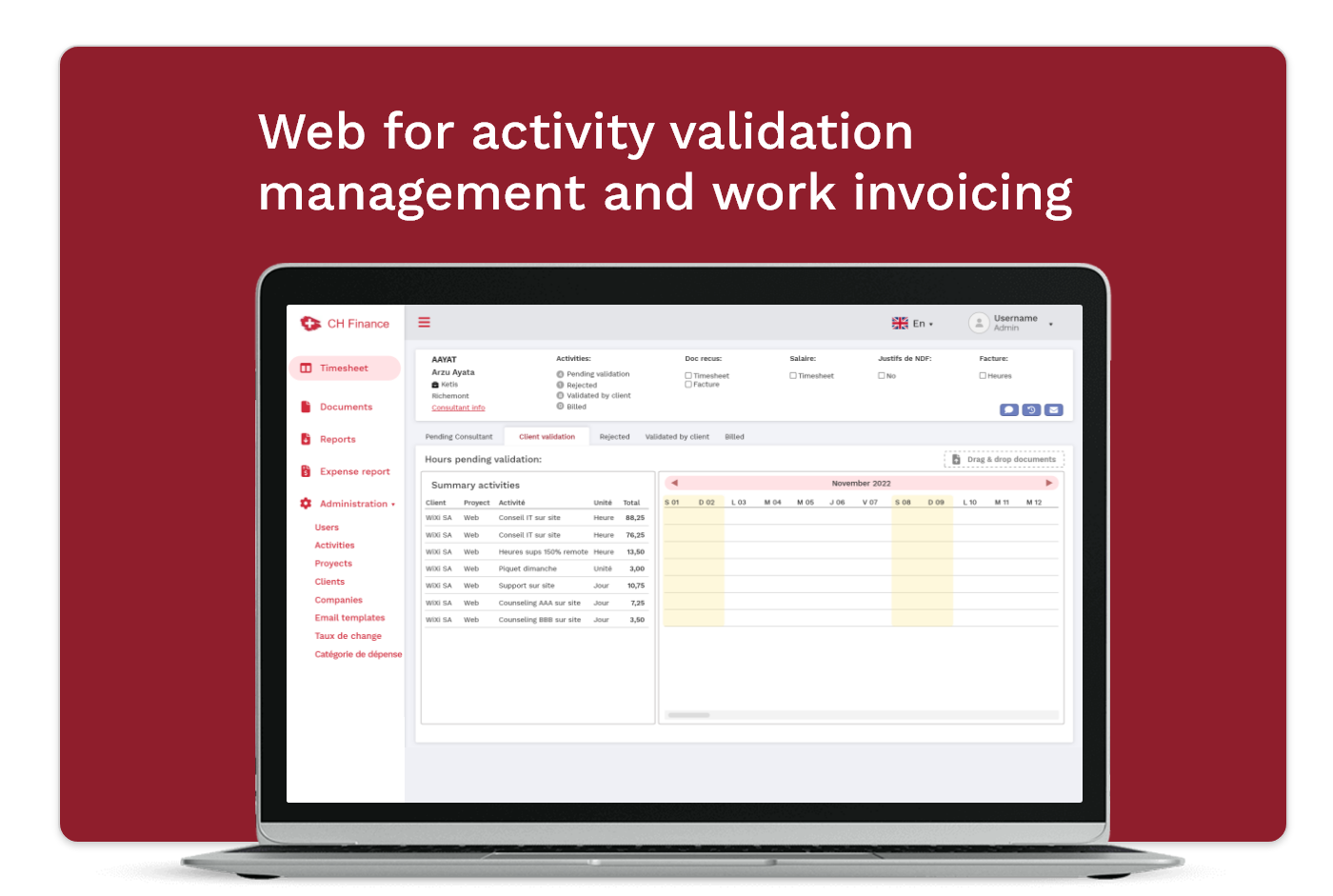
Enterprise platform to improve activity validation, management and invoicing workflows in a tech outsourcing company.
Year2024
RoleUX/UI Designer
PlatformWeb
TypeB2B · Enterprise
🔒 For data privacy reasons, information on this project is limited.
Context
Context
Ch-Finance is an IT consulting company. It is in charge of outsourcing SAP developers.
After years of sustained growth, they reached the point where they needed to improve their internal processes for managing the control of the activities performed by consultants, and the invoicing of projects.
These workflows involved multiple roles, approvals, and compliance constraints, making them susceptible to errors, delays, and limited visibility. The goal was to design a centralized system that could support financial workflows while ensuring data integrity, traceability, and user confidence.
What I did
My role in the project
My role covered the full design process, from early research to final delivery. Working closely with the client, I helped to create new functionalities that brought value to both users and the business.
→ Translate business workflows into clear, intuitive interfaces that reduce friction.
→ Analyzing problems and workflows to uncover gaps, improvements, and opportunities.
→ Designing and implementing user-centered solutions.
→ Partnering with the development team to build and refine the product, enhancing functionality and overall user experience.
→ Iterate designs based on user feedback to refine solutions rapidly.
→ Handoff to development.
What to fix
Problem
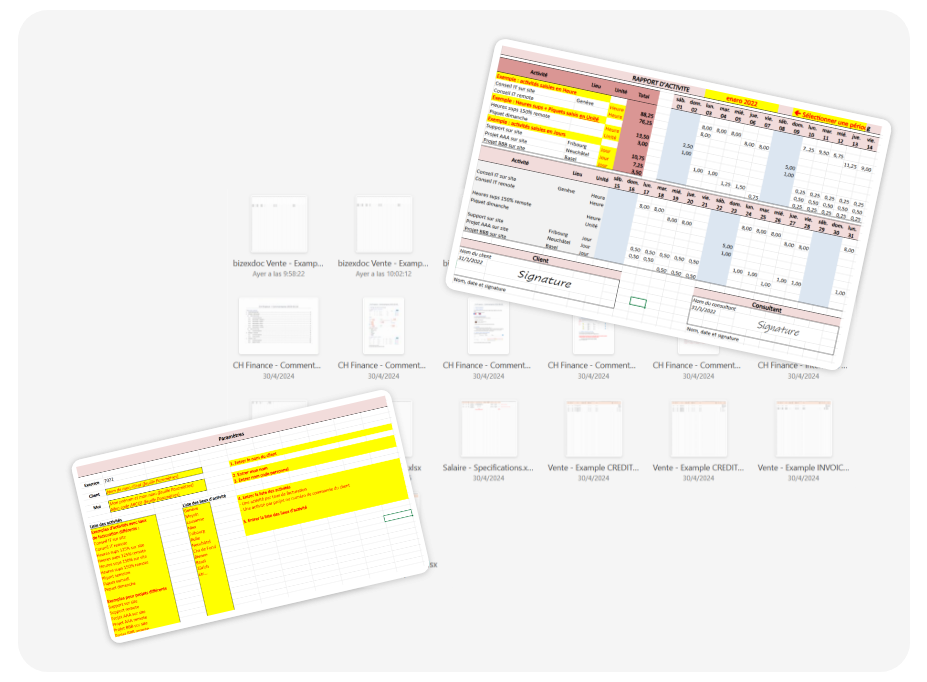
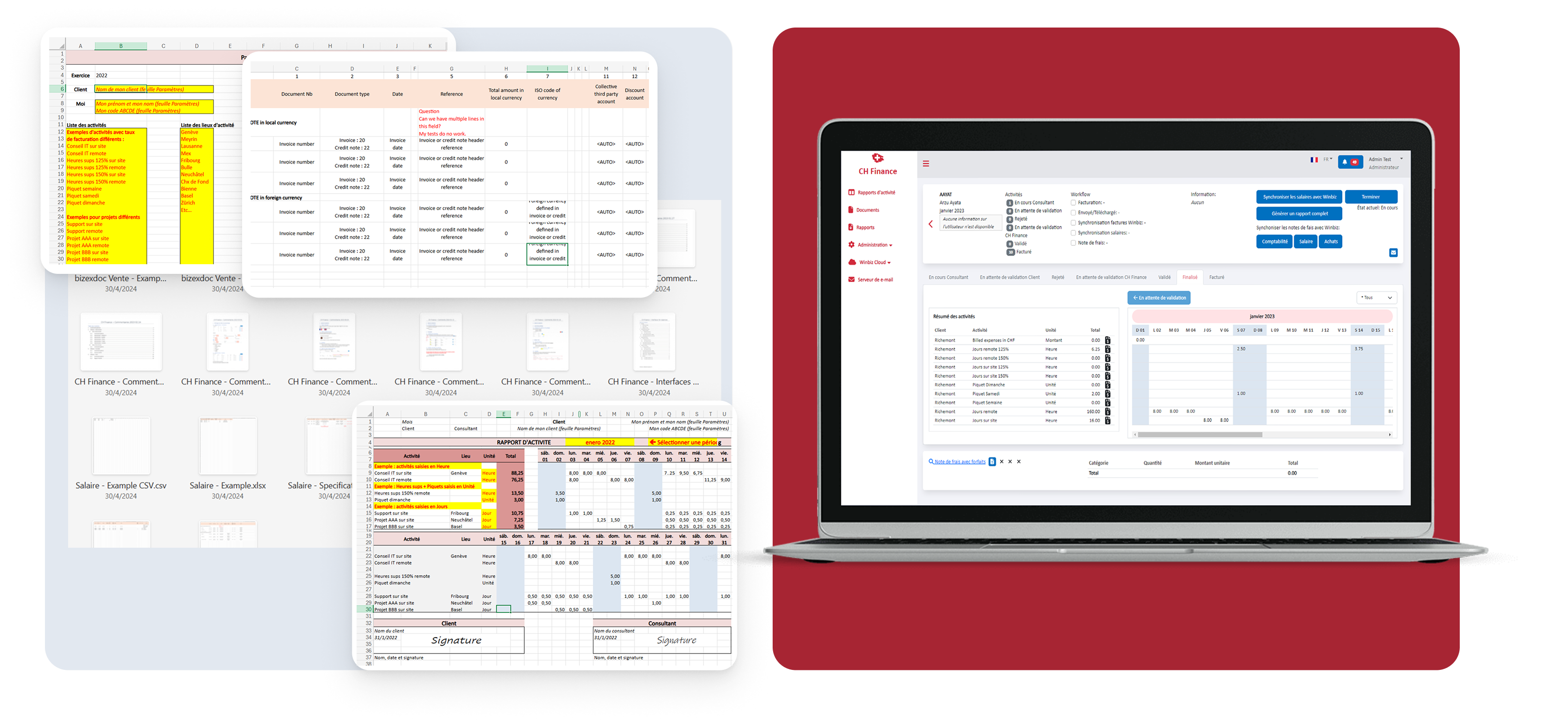
The control processes of activities related to the projects were controlled in multiple Excel files. Files that were stored in the cloud, locally on their personal computers, or forwarded by email.
This made it impossible to trace the information, control internal processes and perform the correct invoicing. Several constraints shaped the solution:
- Strict financial rules
- Role-based access and permission limitations
- The need for auditability and traceability
- High data density and frequent validation tasks
Those screenshots are some examples of the files that they used to run the company
What to build
Proposal
The objective of the project was to move all operations carried out on paper and in multiple Excel files to a cloud-based software.
From the new web, CH-Finance's clients, consultants and employees are be able to keep information up to date, transparent and accessible to all stakeholders.
Understanding
Research
The process began with an stage of gathering information about the business and how the processes were performed.
We needed to analyze and understand how they dumped the operations of the entire business in excel tables, what was each column and cell.
Some steps in the research and definition stage were: defining who the users were, what they do and what their needs and pain points were. Then, we start defining the userflows in detail.
All this stage was based on remote meetings with the client.
Other insights/needs that were discovered during remote sesions:
- Consultants needs to input expenses
- Extra documents/files are shared by email or other channels. s
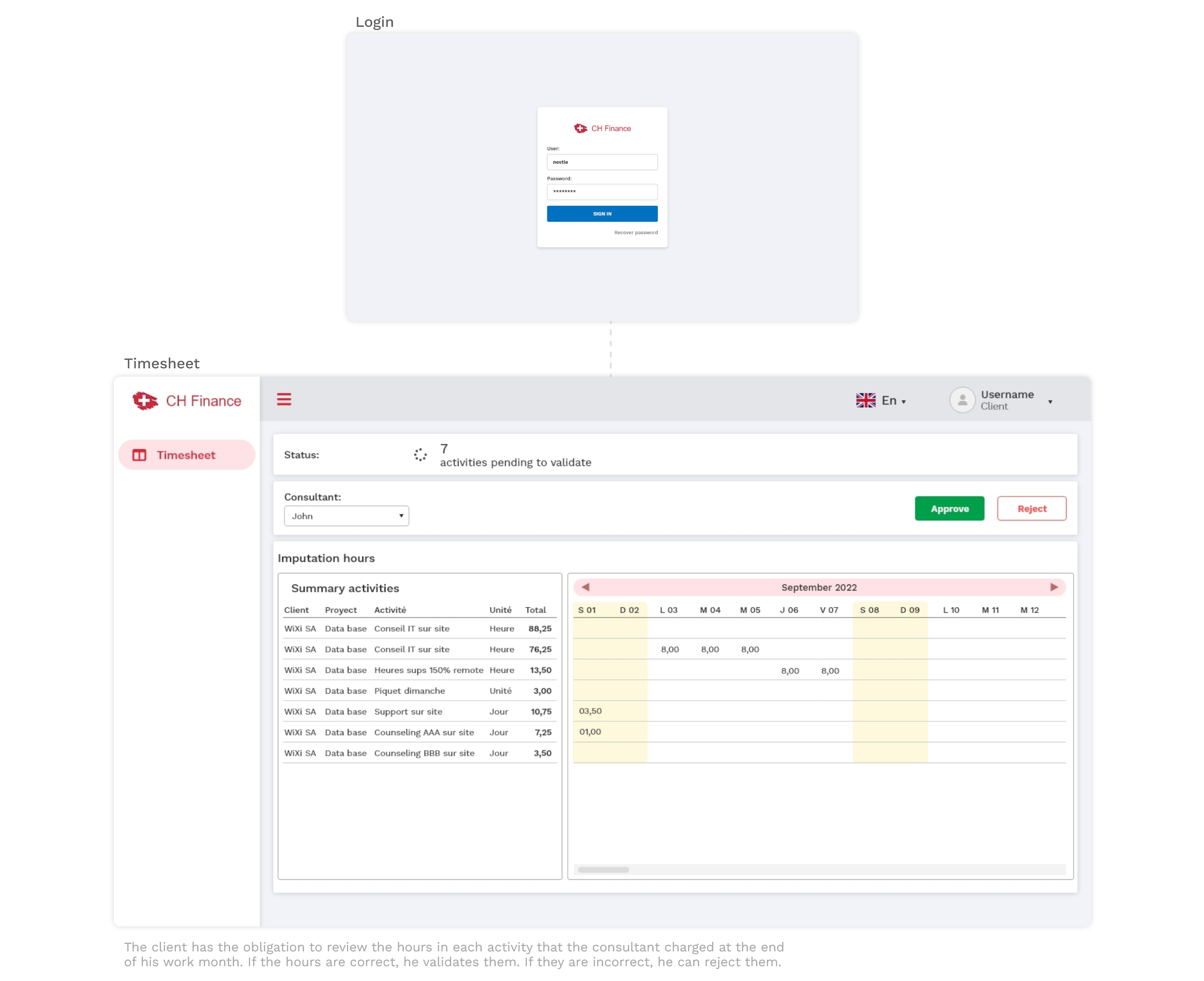
- Client must be able to consult and approve the work, before they were billed for the work.
Users
User definition
🏢
Client
Reviews and validates consultant activity submissions.
👨💻
SAP Consultant
Logs daily work activities and submits timesheets for validation.
⚙️
CH-Finance Admin
Oversees the full workflow, generates invoices and monitors payments.
Workflows
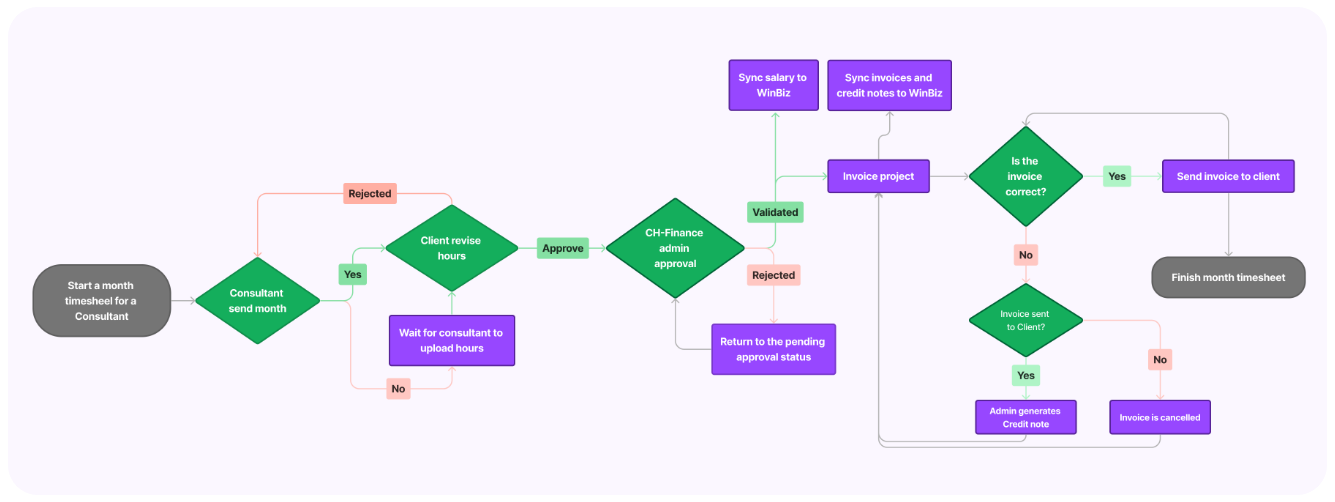
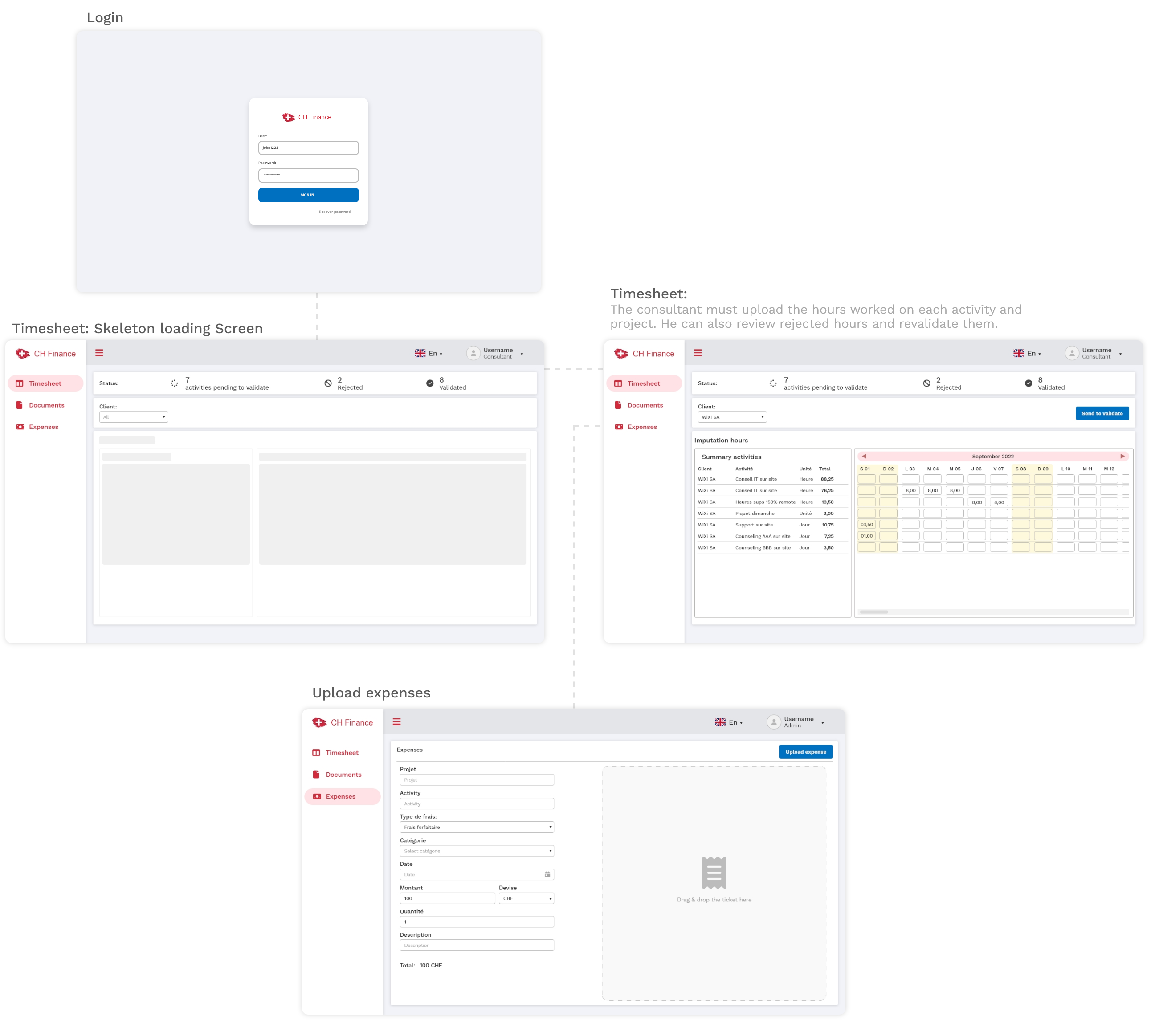
The next step was to map the workflow of approval and rejection of hours charged by consultants at the end of each working moth and invoicing process.
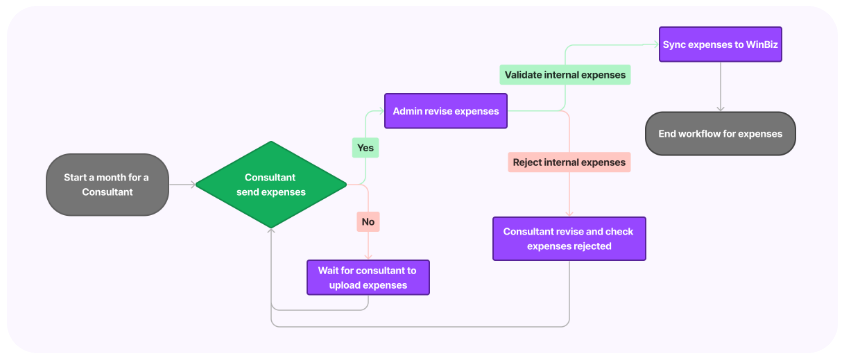
I did the same, defining the workflow for approval and rejection of working expenses and their invoicing.
It was important to define what should happen at each stage, to better understand how the business worked.
Workflow of approval/rejection of hours charged by consultants at the end of each working month and invoicing to clients
Workflow for approval/rejection of labor expenses and corresponding invoicing
Definition
Core functionalities
⏱️
Activity logging
Consultants register daily work hours per project with status tracking.
✅
Validation flow
Clients review and approve submitted timesheets with an auditable trail.
🧾
Invoice generation
Admins generate invoices from validated activities automatically.
📊
Reporting dashboard
Real-time visibility into activity status and payment progress.
👥
User management
Admin control over roles, access levels and consultant profiles.
🔔
Notifications
Automated alerts for pending actions and invoice milestones.
UI Design
UI Design
👨💻 SAP Consultant View
🏢 Client View
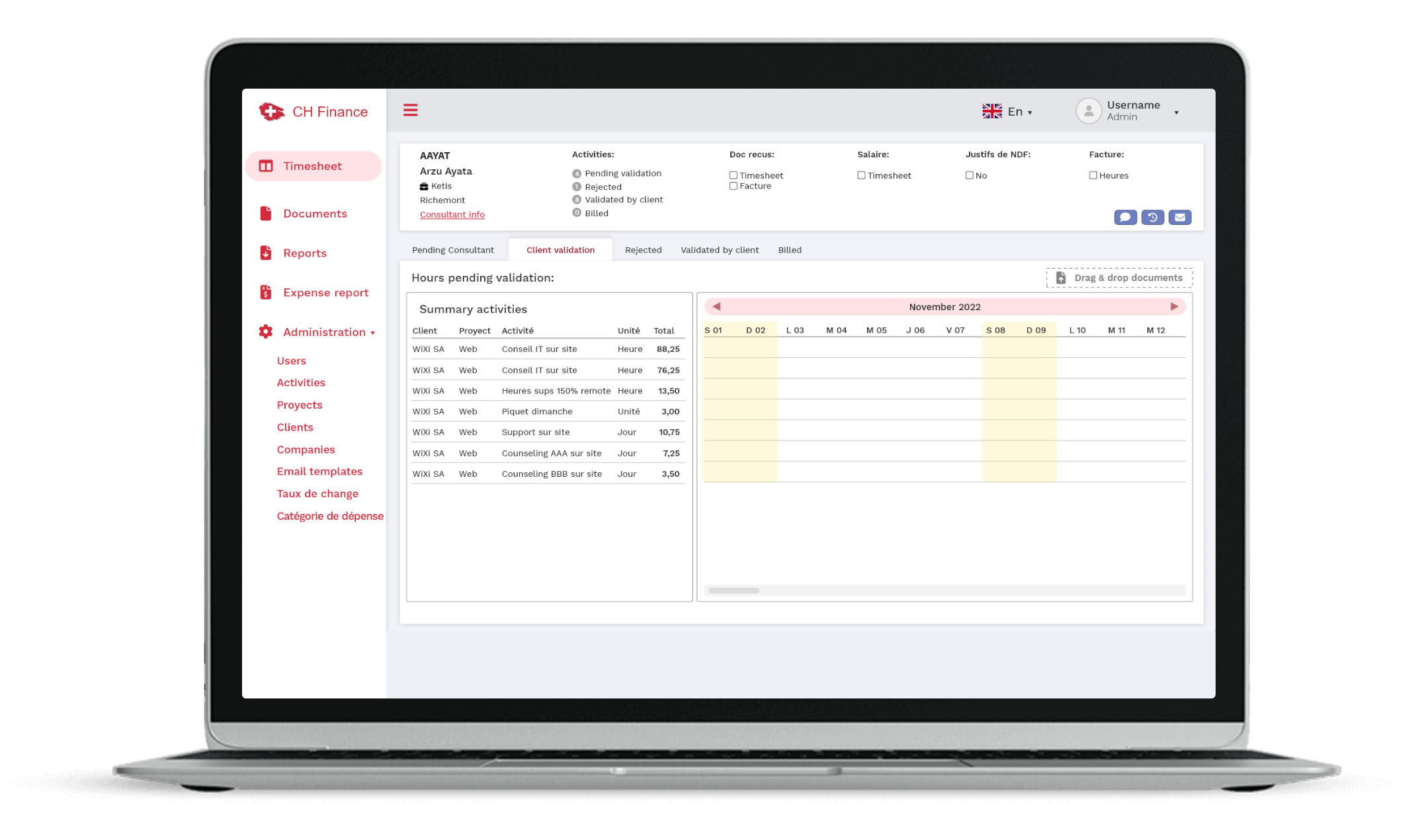
⚙️ CH-Finance Administrator View
The admin view was the most challenging to define and design due to the amount of functionality and business requirements it must perform.
The Administrator user is able to manage the data necessary to carry out all the required operations.
Functionalities that the admin can operate in the system:
↪︎ Management of the complete workflow of uploading and approving hours in the timesheet.
↪︎ Invoicing to customers.
↪︎ Delivery of documents to SAP consultants.
↪︎ Report generation.
↪︎ Manage information of clients, projects, collaborators, and expenses.
Admin Dashboard — Full Overview
Testing the prototypes
Iterations
The interactive prototype was used to test with users and to iterate and refine some issues. We added:
✅ Support for multi currencies
✅ Taxes in the invoicing flow
✅ Email templates for notifications
✅ Minor improvements in the UI
Results
Impact
❌ Before
Manual Excel spreadsheets
Email chains for approval
No status visibility
Error-prone invoicing
Frequent payment delays
✅ After
Centralised digital platform
One-click validation flow
Real-time status for all
Automated invoicing
Faster, trackable payments
Reflections
Lessons learned and reflections
⚙️
How to manage limitations
Time and resource limitations forced us to have some restrictions:
—No design system: We decided to leverage the UI with a UI framework.
—Short sprints, faster reviews and iterations.
🔁
What I would have done differently
I would have implemented analytics from the start to collect usage data for continuous improvement.